
A Name With Meaning
Every WordPress release is named after a jazz musician, and 7.0’s namesake is no accident. Louis Armstrong wove his own unique touch into the fabric of jazz, transforming it from an orchestral tradition into a vehicle for individual expression. The WordPress team drew a clear parallel: just as Armstrong created in a way that was distinctly his own, WordPress 7.0 is built to let you do the same.
AI Foundations: WordPress Meets Generative AI
The headline story of WordPress 7.0 is the arrival of native AI integration — and it’s been approached thoughtfully, with user control front and center.
The AI Client and Abilities API
A new AI Client in Core gives WordPress the ability to communicate with generative AI models. Paired with a new Abilities API, these two components form the backbone of AI-powered functionality in 7.0. Together they introduce new workflow automation tools, content creation features, and new hybrid capabilities accessible directly within the editor.
A companion Client-Side Abilities package brings this power to JavaScript as well, complete with a built-in UI and command palette for performing AI tasks without leaving the editing experience.
The Connectors Screen
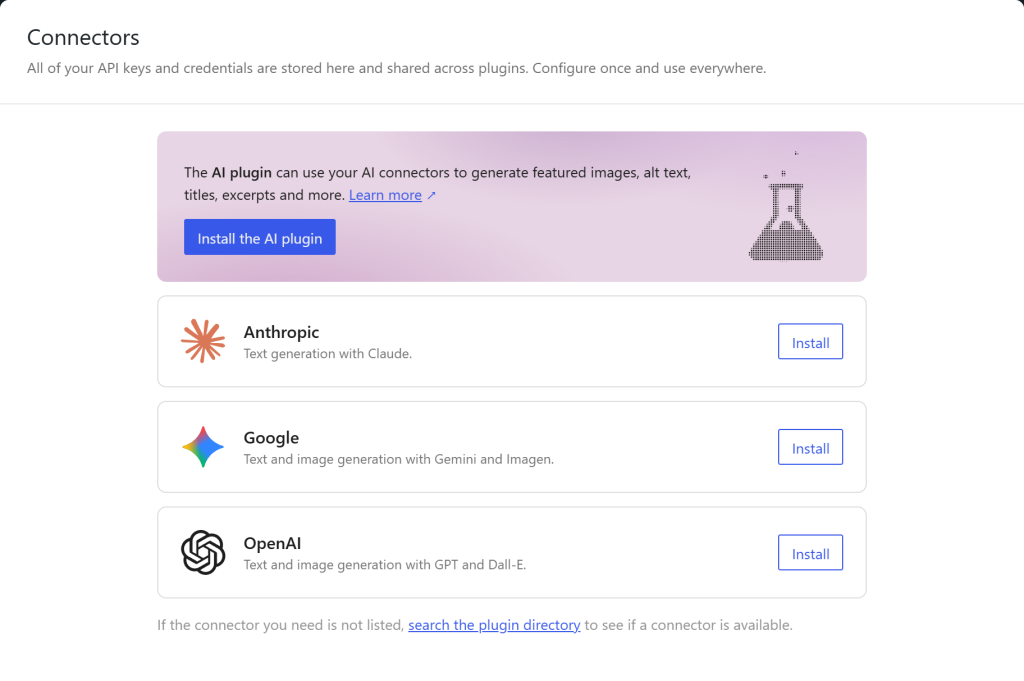
All external service integrations — including AI providers — are now managed from a single, centralized Connectors screen in the dashboard. Users can choose from three presets to get started quickly, or add their own custom connections. Authentication is streamlined to just a few clicks, making it practical for non-technical users to plug in the AI tools they already use.
The Optional AI Plugin
A separate, installable AI plugin extends the core capabilities further. With it, users can generate and edit images, create post titles and excerpts automatically, and get suggested alt text for media — all from within the editor.
A Modernized Dashboard
WordPress 7.0 brings the admin interface into the modern era with a comprehensive visual refresh.
The new default color scheme is cleaner and quieter, featuring updated buttons, inputs, and smooth page transition animations that replace jarring screen jumps with graceful fades. The overall feel is more polished and professional.
A new Command Palette shortcut (⌘K / Ctrl+K) is now pinned to the admin bar, giving users instant access to tools and navigation from anywhere in the dashboard.
Font Library for All Themes
Previously limited to block themes, the Font Library is now available across all WordPress themes — block, hybrid, and classic alike. Users can browse, install, upload, and manage their entire font collection from a single dedicated page in the editor.

Visual Revision History
Reviewing post history gets a major upgrade. A new timeline slider lets you scrub through every saved revision of a page or post, with visual markers that highlight exactly what changed block by block. Restoring a previous version is now a single click.
Design, Create, Customize
WordPress 7.0 brings a wave of new blocks and design tools that give creators more expressive control over their sites.
New Blocks
Four new blocks arrive in this release:
- Gallery Block (Lightbox Slideshow): Showcase image collections in a full lightbox slideshow experience.
- Heading Block: Refined heading management with improved markup control.
- Breadcrumbs Block: Add clear, accessible site navigation breadcrumbs anywhere on a page.
- Icons Block: Insert icons from a built-in library and style them to match any design.
Navigation Overlay Design
The navigation menu overlay is now a fully customizable canvas. Designers can go beyond a simple list of links — adding columns, adjusting typography, embedding a custom close button, and building the overlay from scratch or from a pre-built template.
Patterns as Single Blocks
Patterns now behave as a single unified block when dropped onto a page, eliminating the frustration of hunting through nested block structures to edit individual elements. A single click into “edit pattern” mode unlocks full granular control whenever needed.
Responsive Controls
New per-device visibility controls let you show or hide individual blocks based on screen size without affecting other breakpoints. Styles can be adjusted for different breakpoints, and those breakpoints themselves are now customizable. This gives teams far more control over how sites adapt to mobile, tablet, and desktop contexts.
Block-Level Custom CSS
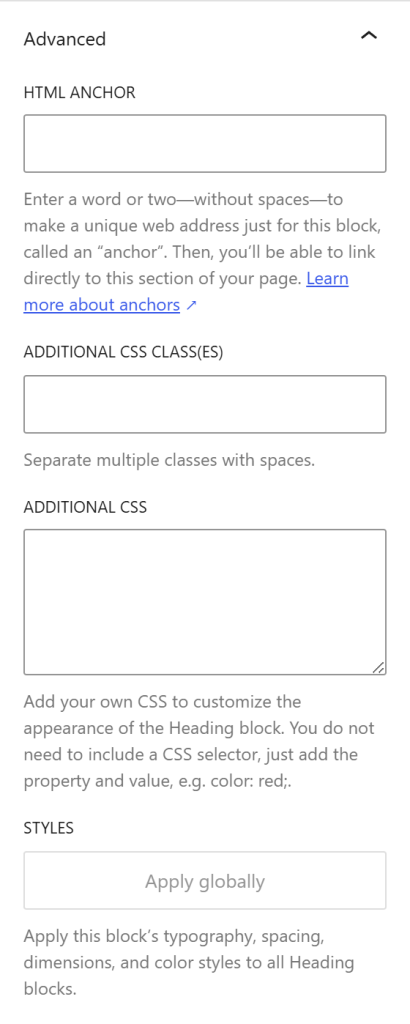
Developers and advanced users can now write custom CSS at the block level, directly within a post or page — no theme file editing required.
Developer Toolbox
WordPress 7.0 ships with a significantly expanded set of developer-facing tools.
PHP-only block registration is now possible: developers can create blocks and patterns entirely on the server side using PHP, with automatic registration via the Block API — no JavaScript build step required.
The Site Editor becomes substantially more extensible, gaining support for routing, route validation, and a new wordpress/boot package that allows plugins to build fully custom Site Editor pages. This opens up significant new territory for plugin developers building within the full-site editing environment.
Performance and Accessibility
Performance
WordPress 7.0 improves the accuracy of image loading prioritization, preventing hidden images in navigation overlays or interactive blocks from degrading the loading speed of visible, critical resources. On-demand block stylesheet loading in classic themes has been made more reliable, and scripts can now declare dependencies on script modules, helping reduce render-blocking behavior.
Accessibility
Accessibility improvements span media management, voice control usability, and color contrast — the last of which benefits directly from the new admin color scheme. The editor also ships with improvements to navigation and block interaction for assistive technologies.
By the Numbers
WordPress 7.0 is the result of a massive open-source effort:
- 900+ contributors from countries around the world
- 279+ first-time contributors
- 420+ enhancements and bug fixes
- 70+ locales with full translations
- 21+ web hosts that tested pre-release versions for compatibility
The release was led by Matias Ventura, with tech leads Ella van Durpe, Mukesh Panchal, and Sergey Biryukov.
WordPress 7.0 “Armstrong” is more than an incremental update — it’s a platform shift. The AI foundations introduced here are deliberately modular and opt-in, respecting user choice while opening the door to a new generation of content workflows. The modernized dashboard reduces friction for everyday users, the new blocks and design tools expand creative possibilities, and the developer improvements give builders more control than ever.
Just as Louis Armstrong didn’t just play jazz — he reshaped what jazz could be — WordPress 7.0 invites everyone, from bloggers to enterprise developers, to build the web in a way that is uniquely their own.